
How to install Quickbooks 2007 Pro on windows 11
- Copy contents of the installation CD into a folder on your computer
- Right click on the “Setup.exe” program in the folder and select Properties
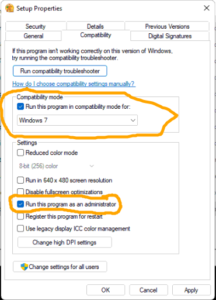
- On the Compatibility Tab set Compatibility Mode to Windows 7 and Check the option to “Run this program as an administrator” and click OK to save the changes
- Run the Setup program and follow the installation screens
There is also this thread on the Microsoft forums that may help if the above does not work: https://answers.microsoft.com/en-us/windows/forum/all/quickbooks-2007-will-run-on-windows-10/40d4672c-803f-4c31-b49b-9396a6b1c63f?page=1